Blog

  • Day 05 at rtCamp

    Domain Name System (DNS)

    DNS resolves human-readable domain names into IP addresses. For example, www.google.com → 142.250.182.100.

    Process:

    1. Browser checks cache
    2. Queries OS resolver
    3. Resolver checks root → TLD → Authoritative server
    4. IP returned and cached

    HTTP / HTTPS

    • HTTP (Hypertext Transfer Protocol): Application-level protocol used for communication between clients and servers.
    • HTTPS: Secured version of HTTP using SSL/TLS encryption.

    Important Headers:

    • Content-Type
    • Authorization
    • User-Agent
    • Cache-Control

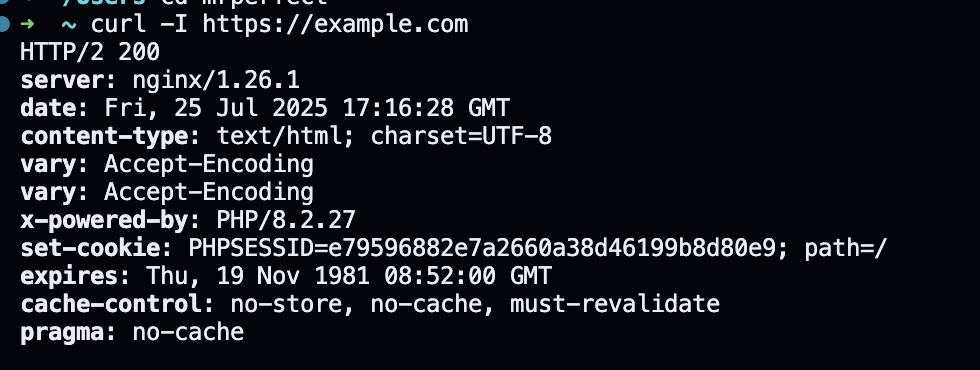
    Curl example:
    curl -I https://example.com

    Status Codes:

    • 200: OK
    • 301/302: Redirect
    • 403: Forbidden
    • 404: Not Found
    • 500: Server Error

    How the Web Works

    Client-Server Architecture

    • Client (Browser) sends HTTP request
    • Web server handles the request
    • Server responds with HTML/CSS/JS
    • Browser renders the content

    Process:

    1. DNS resolution
    2. TCP connection (3-way handshake)
    3. TLS handshake (for HTTPS)
    4. HTTP request/response cycle
    5. DOM construction and rendering

    Emails: Protocols and Structure

    Email System Involves:

    • MUA: Mail User Agent (e.g., Outlook, Thunderbird)
    • MTA: Mail Transfer Agent (e.g., Postfix, Exim)
    • MDA: Mail Delivery Agent (e.g., Dovecot)

    Protocols:

    • SMTP: Sending emails
    • POP3/IMAP: Retrieving emails

    Sample PHP email (using mailpit or SMTP):

    mail('to@example.com', 'Subject', 'Hello World', 'From: from@example.com');

    SMTP, IMAP and POP: Email Protocols

    Email communication relies on different protocol to send and receive emails from one client to the other. Those protocols are as follows:

    • SMTP (Simple Mail Transfer Protocol): This protocol is used to send emails between servers and clients.
    • IMAP (Internet Message Access Protocol): Allows email access to the email client while keeping message on the server.
    • POP (Post Office Protocol): Downloads emails to a client and removed them from the server.
    ProtocolPurposeStorage
    SMTPSending emailsN/A
    IMAPReceiving emails and syncing emailsEmails remain on the server
    POPReceiving emailsEmails are removed from the server

    IMAP is preferred for accessing emails from multiple devices, whereas POP is useful for offline email access or where just a single devise is setup to receive email.
  • Day 04 at rtCamp

    PHP Core Concepts

    Input Sanitization & Validation

    function test_input($input) {
    $input = trim($input);
    $input = stripslashes($input);
    $input = htmlspecialchars($input);
    return $input;
    }

    Validation Examples:

    // Email
    filter_var($email, FILTER_VALIDATE_EMAIL);

    // Name
    preg_match("/^[a-zA-Z-' ]*$/", $name);

    // URL
    preg_match("/\b(?:(?:https?|ftp):\/\/|www\.)[-a-z0-9...]/i", $website);

    Database with PDO

    Connection:

    $conn = new PDO("mysql:host=$servername", $username, $password);
    // set the PDO error mode to exception
    $conn->setAttribute(PDO::ATTR_ERRMODE, PDO::ERRMODE_EXCEPTION);

    Insert Records Using Prepared Statements:

    $stmt = $conn->prepare("INSERT INTO MyGuests (firstname, lastname, email)
    VALUES (:firstname, :lastname, :email)");

    $stmt->bindParam(':firstname', $firstname);
    // ...
    $stmt->execute();

    API Integration with GitHub

    A working code sample is available here view Full PHP Code on GitHub

    Write code for the Collecting data from the Gihub Timeline using this code:

    $curl = curl_init();
    curl_setopt($curl, CURLOPT_RETURNTRANSFER, true);
    curl_setopt($curl, CURLOPT_URL, 'https://github.com/timeline');
    curl_setopt($curl, CURLOPT_CAINFO, '/etc/ssl/cert.pem');
    $contents = curl_exec($curl);

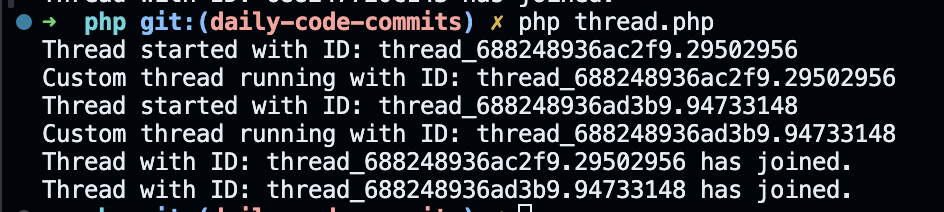
    Threads in PHP

    <?php
    if (!class_exists('Thread')) {
    class Thread {
    protected $threadId;
    public function __construct() {
    $this->threadId = uniqid('thread_', true);
    }

    public function getCurrentThreadId() {
    return $this->threadId;
    }

    public function getCurrentThread() {
    return $this;
    }

    public function start() {
    echo "Thread started with ID: " . $this->getCurrentThreadId() . "\n";
    $this->run();
    }

    public function join() {
    echo "Thread with ID: " . $this->getCurrentThreadId() . " has joined.\n";
    }

    public function run() {
    echo "Running thread with ID: " . $this->getCurrentThreadId() . "\n";
    }
    }
    }

    class CustomThread extends Thread {
    public function run() {
    echo "Custom thread running with ID: " . $this->getCurrentThreadId() . "\n";
    }
    }

    $thread1 = new CustomThread();
    $thread2 = new CustomThread();

    $thread1->start();
    $thread2->start();

    $thread1->join();
    $thread2->join();

  • Day 03 at rtCamp

    Understanding localVM 

    I started off by exploring localVM, the virtualized local development environment. This involved understanding:

    • How project paths are internally referenced and mounted i.e ‘/Users/mrperfect/Local Sites/examplecom’
    • How SSL certificates are generated and how to trust them by running commands like as below
    • Gone through its database as per the task in timeline assignment deleted it.
    • Cloned my repo inside the app folder as suggested in development.md

    I dived into PHP starting with file handling and moving toward debugging techniques. A basic example I played with:

    I also explored debugging with:

    • var_dump() and print_r()
    • Enabling xdebug on localVM for step-by-step debugging via VSCode

    Also explored some of the basic syntax & type of PHP from https://www.php.net/manual/en/langref.php

    JavaScript – Event Loop and Threading Basics

    Even though JavaScript runs on a single thread, I took time to understand how it handles concurrency using:

    • Event Loop
    • Callback Queue
    • Microtask Queue (Promises, MutationObservers)

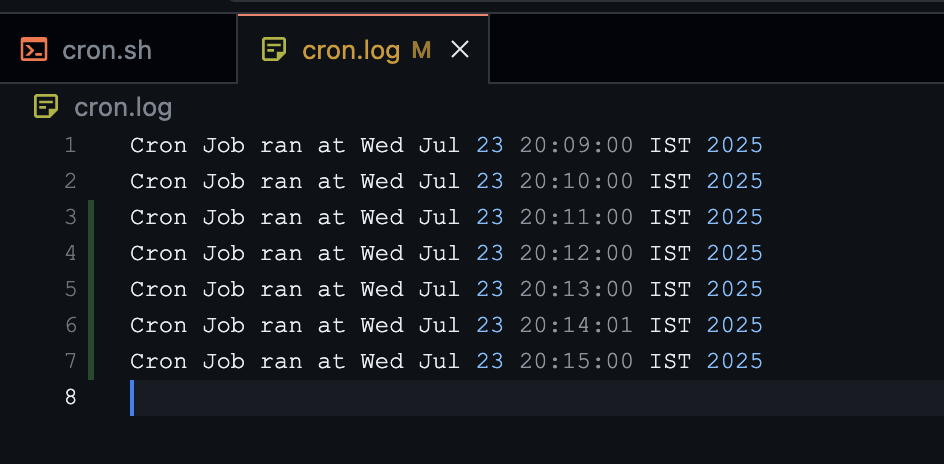
    Cron Jobs

    I also explored cron jobs  essential for scheduling tasks in backend environments

    Each cron job follows this format:

    * * * * * /command/to/run arg1 arg2
    # ┬ ┬ ┬ ┬ ┬
    # │ │ │ │ │
    # │ │ │ │ └──── Day of the Week (0-7) (Sunday=0 or 7)
    # │ │ │ └────── Month (1-12)
    # │ │ └──────── Day of the Month (1-31)
    # │ └────────── Hour (0-23)
    # └──────────── Minute (0-59)


    Mailpit – Simplifying Email Testing

    I set up and explored Mailpit, a tool that catches all local emails so that no test email goes out to real users.

    Will be testing it tonight.

    Explored some of the concepts of os and oops.

  • Day 02 at rtCamp

    The second day at rtCamp as an Associate Software Developer felt like opening the first chapter of a manual full of clarity and support

    LocalVM Setup

    The day began with setting up LocalVM, which is the core environment we’ll be working in during our training phase. It was a technical but satisfying start, getting hands-on and preparing our machines for the work ahead.

    Training Orientation with the L&D Team

    Later in the morning, we had our Training Orientation Session with the Learning & Development team. This was a comprehensive 2.5-hour deep-dive into what lies ahead in our training journey.

    We covered:

    • 📅 Course timelines
    • 📌 Key principles
    • 🚩 Red flags to avoid
    • 📈 Evaluation methods and expectations

    Exploring the Midday

    The midday segment of my Day 2 at rtCamp was heavily focused on deep research and conceptual clarity. While I was familiar with many of the terms, I took this opportunity to revisit fundamentals, explore real-world use cases, and visualize flows.

    I spent a good amount of time sketching diagrams and documenting my understanding all of which I added to the GitHub comments for future reference.

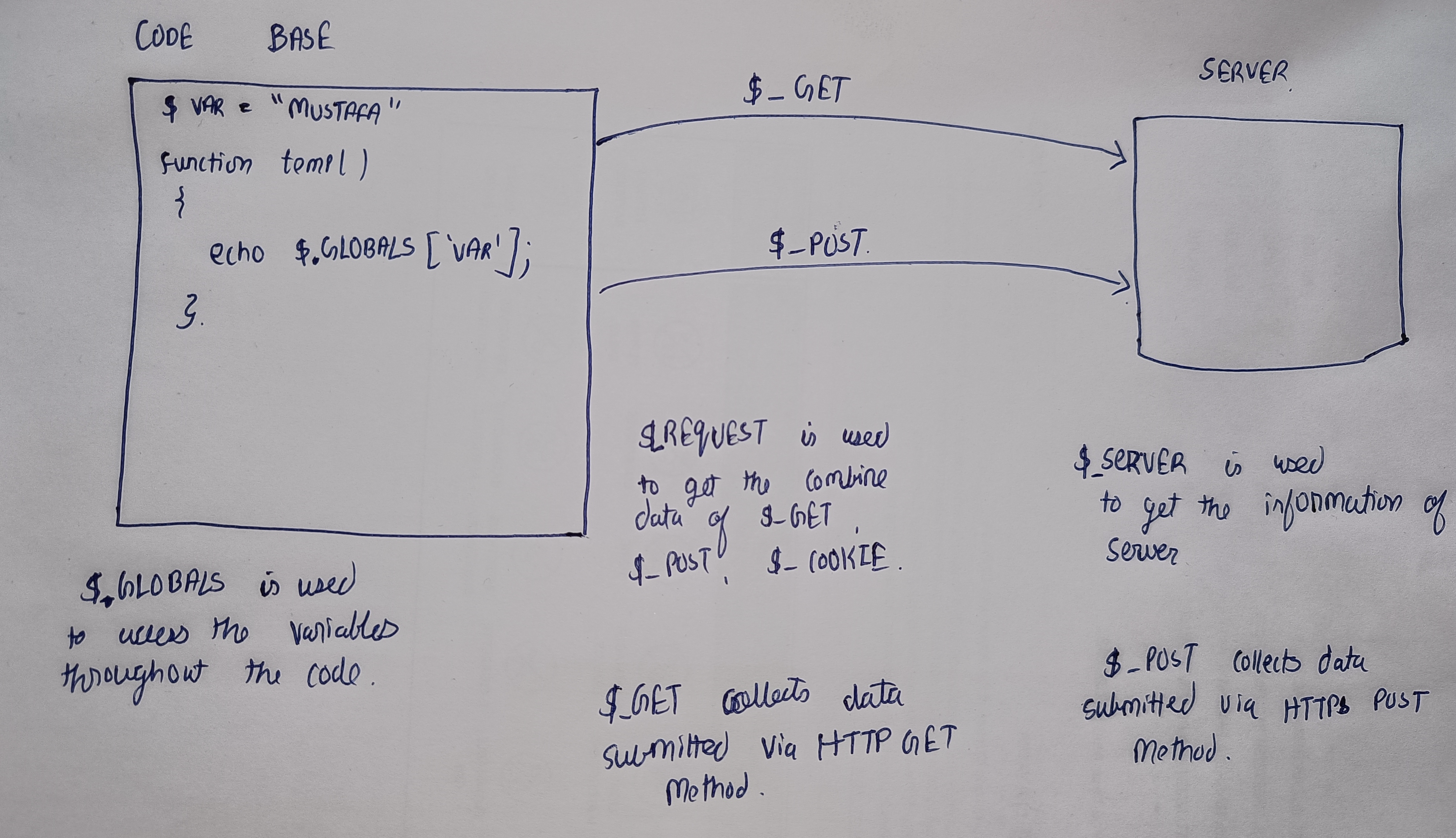
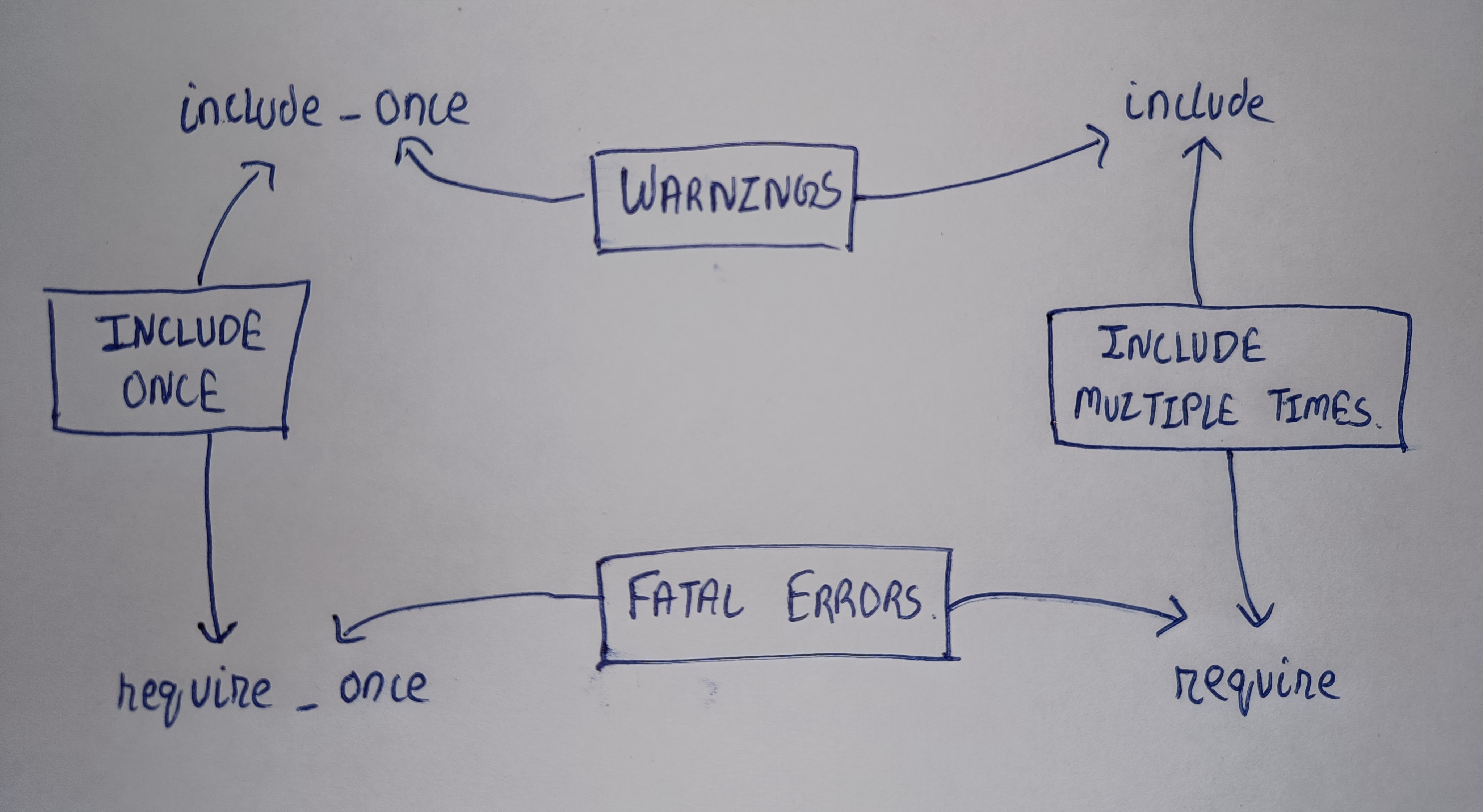
    Let me share a few snapshots of the diagrams I created 👇

    Below diagram is for the difference between $GLOBALS, $_SERVER, $_REQUEST, $_GET and $_POST.

    Below diagram is for  Include vs Require vs Include_once vs Require_once in PHP.

    Below diagram is to read XML files in PHP

    Day 2 was a perfect blend of technical setup, exploration, and reflective learning. From configuring my development environment to diving deep into PHP fundamentals and visualizing system flows, the day was packed with purposeful progress. Every task, whether small or complex, added a new layer to my understanding of the rtCamp ecosystem.

    Looking forward to what Day 3 brings with curiosity high and motivation even higher! 💻🚀

  • Day 01 at rtCamp

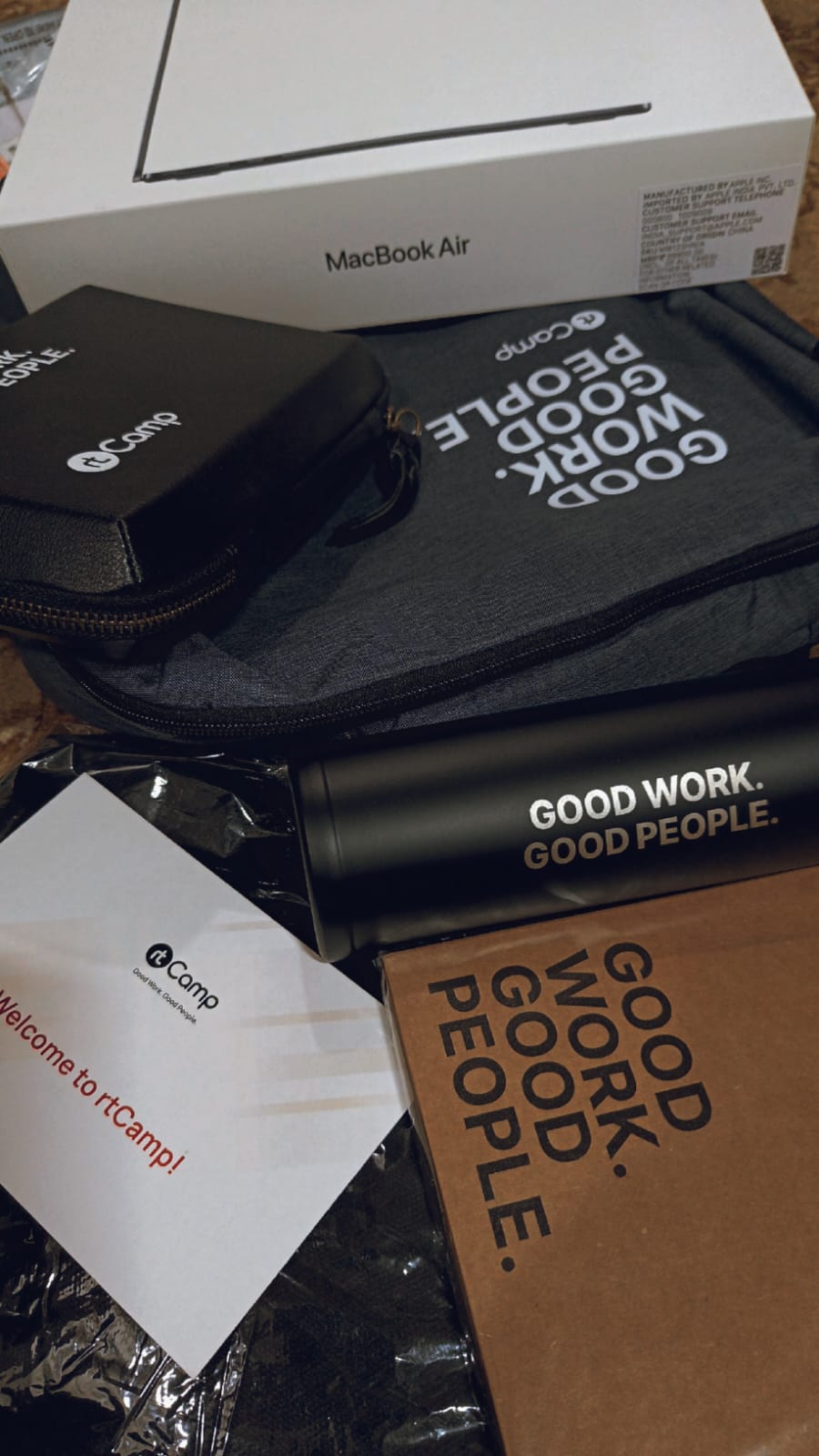
    21st July, 2025: A day to Remember

    Starting a new chapter is always a mix of excitement, curiosity, and just a hint of nerves and my first day at rtCamp beautifully brought all of those emotions to life.

    As I stepped into this journey as an Associate Software Developer, I was welcomed with a warm and structured onboarding experience that made everything feel just right.

    Getting Started with the Essentials

    The day began with reviewing and setting up the software essentials shared by our HR, Dimpal. With clear instructions and a well organised checklist, I was able to complete all the required setups efficiently from installations to initial configurations. It felt satisfying to begin the day by checking off those foundational steps.

    Meeting the Team

    Soon after, we had our first welcome meeting with the HR team, where we were introduced to our fellow joinees and the people who make rtCamp run behind the scenes. The interaction was light yet informative, helping us ease into the environment comfortably.

    During the session, we were guided through internal tools like ERP and Slack, and shown how to navigate our onboarding checklist. Having that walkthrough made the process smooth and approachable.

    Diving into ERP Tasks

    Once the introductions wrapped up, we turned our attention to the ERP onboarding tasks. These were thoughtfully crafted to help new joiners familiarize themselves with internal systems and practices.

    From linking Aadhaar with PAN, to setting up two-factor authentication for platforms like GitHub and Google each task came with detailed instructions, which really simplified the process. It was evident how much effort rtCamp puts into making onboarding beginner-friendly.

    A Chat with My rtBuddy 🤝

    One of the highlights of my day was the one-on-one session with my rtBuddy (Shalin Shah). rtCamp pairs every new team member with a buddy someone who has walked the same path and is there to make your transition smoother.

    My rtBuddy was incredibly approachable and shared valuable insights about life at rtCamp. We talked about the work culture, best practices, and how to make the most of this initial learning phase. That conversation helped me feel a lot more settled and confident.

    Exploring the Learning & Development Ecosystem

    After a quick lunch break, we regrouped for a line-up call with the Learning & Development team. This session introduced us to rtCamp’s story, core values, and the broader vision that ties it all together. It was inspiring to hear how the company prioritizes openness, growth, and continuous learning.

    We were also introduced to the rtCamp Handbook, a comprehensive resource covering everything from communication guidelines to project workflows. It truly reflects the culture of transparency and documentation that rtCamp stands for.

    Wrapping the Day with the Training Team

    To conclude our first day, we had a session with the Training Team, where the real excitement kicked in. We explored the learning roadmap for the coming weeks and got to know the technologies and tools we’ll be diving into.

    We also met our dedicated trainer, who will be mentoring us throughout this four-month training period. The session gave us a clear understanding of the expectations, milestones, and support system in place which left me even more excited for what’s ahead.

    After meeting spend some time with the handbook after that it was a time for rtBuddy to share with the details of the day.

    Final Thoughts

    The first day at rtCamp wasn’t just about checklists and meetings it was about feeling included, informed, and inspired. The warmth of the team, the clarity in communication, and the attention to detail in every task made it a day to remember.

    It’s just the beginning, and I’m genuinely excited about the road ahead. Here’s to learning, growing, and contributing one commit at a time.